

 wiki
wikiVeeam Support ID
For the renewal of an existing Veeam support contract or one that is about to expire, the Veeam Support ID[1] of the product is needed.
This information can be found in your Veeam application under License
-
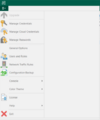 Select License
 -
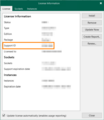 The support ID can be found under license information


Alternative ways
- You can log into your Veeam customer portal and find the support ID under your products
- In your license file (.lic), which can be opened with a word processor. The field is marked with Support ID=.
References
 |
Author: Stefan Bohn Stefan Bohn has been employed at Thomas-Krenn.AG since 2020. Originally based in PreSales as a consultant for IT solutions, he moved to Product Management in 2022. There he dedicates himself to knowledge transfer and also drives the Thomas-Krenn Wiki.
|

 |
Translator: Alina Ranzinger Alina has been working at Thomas-Krenn.AG since 2024. After her training as multilingual business assistant, she got her job as assistant of the Product Management and is responsible for the translation of texts and for the organisation of the department.
|





