

 wiki
wikiUpdate Veeam end customer data
The specification of the end customer data is obligatory when receiving Veeam licenses. This article describes the procedure of changing the stated end customer data after purchasing the license.
The change must be performed directly via the Veeam portal and can not be made via Veeam partner.
End customer data
Veeam Backup licenses are tied to the end customer, which is the applicant of the software and receives the access to the Veeam support portal.
Procedure
The following gallery describes the procedure of changing the end customer data after purchasing the license. Go to the Veeam Support Website to perform the following steps:
-
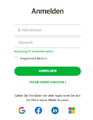 Log in to the Veeam Support Portal.
 -
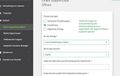 You can open a support case via the Support tab.
 -
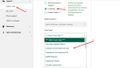 Select Licensing.
 -
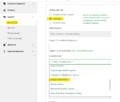 In the mandatory field Licensing Issue, select Merge License.
 -
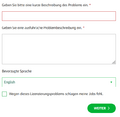 Now enter a description of your case.


Then enter the new end customer data in the free text field. The Veeam-support will then contact you.
Please note that the Veeam-support is provided in English.
 |
Author: Stefan Bohn Stefan Bohn has been employed at Thomas-Krenn.AG since 2020. Originally based in PreSales as a consultant for IT solutions, he moved to Product Management in 2022. There he dedicates himself to knowledge transfer and also drives the Thomas-Krenn Wiki.
|

 |
Translator: Alina Ranzinger Alina has been working at Thomas-Krenn.AG since 2024. After her training as multilingual business assistant, she got her job as assistant of the Product Management and is responsible for the translation of texts and for the organisation of the department.
|





