

 wiki
wikiASMB update via DOS-stick
In this article, we explain how to perform a firmware update with a Creating a Bootable DOS USB Stick on ASUS-mainboards with ASMB7, ASMB8, ASMB9 and ASMB10. This can also be used if thee is no access on the web surface of the ASMB.
Used hardware
The following hardware was used for the performance of the firmware update:
- 1HE Asus Barebone RS700-E10-RS12U
- Asus Mainboard Z12PP-D32 with ASMB 10
- Intel Xeon Silver 4309Y
- 8 GB (1x 8192 MB) ECC Registered (RDIMM) DDR4 2933 RAM
Firmware
The latest ASMB-firmware can be downloaded in our Download Website or directly at ASUS [1].
Performance
For the update via DOS, you need a Creating a Bootable DOS USB Stick. After the USB-stick has been created, the firmware archive must be unpacked and copied on the USB-stick.
-
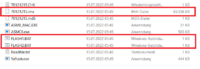 In the bottom folder, you should see two .bat files and one .ima file.
 -
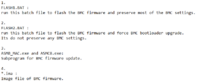 The descriptions for the files are in the readme-text file. Use FLASH1.BAT if you want to retain most BMC settings, and FLASH2.BAT if you do not want to retain the settings. The firmware itself is included in the .ima-file.
 -
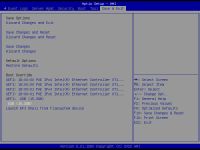 After connecting the USB stick to the server, select and start the USB stick without the prefix “UEFI” in the BIOS under the “Save & Exit” tab in the “Boot Override” submenu. After connecting the USB stick to the server, select the USB stick without the prefix “UEFI” in the BIOS under the “Save & Exit” tab in the “Boot Override” submenu and start it.
 -
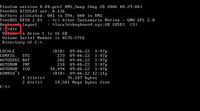 If the DOS-surface has been booted, all folders and files, which are on the USB-stick, can be listed with the command "dir".
 -
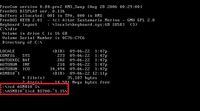 The current folder can be changed with the help of the command "cd". You must navigate to the subfolder containing the firmware files. Command syntax: cd "name of folder"
 -
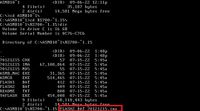 You can now start the update. The following command must be performed: "FLASH2.bat *Firmware*.ima" OR "FLASH1.bat *Firmware*.ima". The update starts automatically after entering. After the update has been completed, the command line is shown again and the server can be restarted.


Special case with FLASH3.BAT
The ASUS barebone RS500A-E10-RS12U (installed in 1U AMD single-CPU RA1112 server and Proxmox Ceph HCI (All NVMe)) and other ASUS systems also have a FLASH3.BAT file among the normal FLASH.BAT files. This must be used when updating the firmware from the 1.0 or 2.0 series to the 2.2 series, as otherwise complications may arise. No BMC settings are transferred either. The update process itself remains unchanged.
Excerpt from readme.txt:
FLASH3.BAT :

run this batch file to flash the BMC firmware from BMC 1.0 series and BMC 2.0 series to BMC 2.2 series.

Its do not preserve any BMC settings.

More notification please see "BMC 2.2 firmware series notification.txt"
References
 |
Translator: Alina Ranzinger Alina has been working at Thomas-Krenn.AG since 2024. After her training as multilingual business assistant, she got her job as assistant of the Product Management and is responsible for the translation of texts and for the organisation of the department.
|





