

 wiki
wikiVCenter 8.0U2 installation upgrade ends in kernel panic
The versions vCenter 8.0U2 / 8.0U2a that were published in September or October 2023, can not be used for certain server systems. During the attempt of using one of the two versions on an affected system, the Photon GuestOS of the vCenter with the following kernel panic error stays:"not syncing: alg: self-tests for ecdh-generic (ecdh) failed in fips mode!". In this article, symptoms and causes as well as solution approaches are explained.
Symptoms
1.1 vCenter Installer
When vCenter 8.0U2 / U2a is installed on an affected system, the error manifests itself in the installer getting stuck at Stage: 1 at 80% effort. Even after more than an hour, the loading bar has not progressed on our test system. A look at the console of the vCenter VM reveals that the VM stopped at the start of the RPM installation with the kernel panic message “not syncing: alg: self-tests for ecdh-generic (ecdh) failed in fips mode!"
-
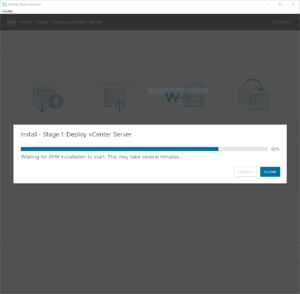 The vCenter GUI Installer stops at 80 per cent in Stage 1
 -
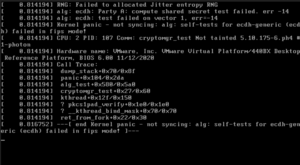 The console of the vCenter VM displays a kernel panic.


1.2 vCenter Upgrade
When upgrading vCenter to version 8.0U2 or 8.0U2a, the installer initially runs without any problems. When the step "Converting data as part of post install" is reached, the vCenter VM crashes again with the same kernel panic message: "not syncing: alg: self-tests for ecdh-generic (ecdh) failed in fips mode!"
-
 The upgrade process stops at the step "Convertig data as part of post install".
 -
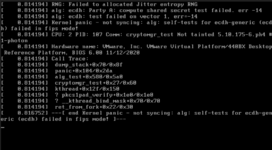 The console of the vCenter VM displays a kernel panic.

Affected systems
All of the systems, which has one of the following AMD CPUs installed, are affected:
AMD EPYC 7343
AMD EPYC 7262
AMD EPYC 7F72
AMD EPYC 74F3
The reason for this is that, due to an error, the self-test routine of the Federal Information Processing Standard (FIPS) [1] fails on the CPU models mentioned.
Solutions
There is no official solution for this problem. If possible, the vCenter should be moved/installed on a server that has a different, unaffected CPU model installed.
As soon as VMware has published a new vCenter version, that fixes the error, this article will be updated. It is recommended to subscribe the 95172 KB article to obtain an email message for new information on the problem.
References
https://kb.vmware.com/s/article/95172 Author: Florian Sebald
 |
Translator: Alina Ranzinger Alina has been working at Thomas-Krenn.AG since 2024. After her training as multilingual business assistant, she got her job as assistant of the Product Management and is responsible for the translation of texts and for the organisation of the department.
|





