

 wiki
wikiVMware Horizon Linux Client Black Screen
If you try to establish a connection with a virtual desktop with the VMware Horizon Linux Client, it may happen that the screen stays black (Black Screen). The systems with Intel graphics are affected. The H.264- and HEVC-coding can be deactivated in the VMware Horizon Blast Configuration as workaround.
Problem
The virtual screen stays black during the attempt to connect to a virtual desktop with VMware Horizon Linux Client.
Testsystem:
- Thinkpad X390 with Intel Core i5-8365U CPU with integrated graphic
- Linux Mint Debian Edition 6 (LMDE 6) with Linux Kernel 6.1.0-13-amd64
- VMware Horizon Linux Client 2309.1 Build 8.11.1
Solution
VMware reports potential issues with H.264- and HEVC-coding with Intel graphics.[1] The deactivation of this coding solves the problem:
-
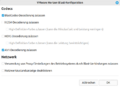 Under File -> Configure VMware Blast, disable H.264 and HEVC encoding. Now reconnect to the desktop.
 -
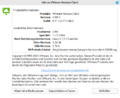 This solution has been tested with VMware Linux Client 2309.1 Build 8.11.1 by us.


More information
- VMware Horizon Client for Linux 2309.1 Release Notes (docs.vmware.com, 16.11.2023)
References
 |
Author: Werner Fischer Werner Fischer, working in the Knowledge Transfer team at Thomas-Krenn, completed his studies of Computer and Media Security at FH Hagenberg in Austria. He is a regular speaker at many conferences like LinuxTag, OSMC, OSDC, LinuxCon, and author for various IT magazines. In his spare time he enjoys playing the piano and training for a good result at the annual Linz marathon relay.
|
 |
Translator: Alina Ranzinger Alina has been working at Thomas-Krenn.AG since 2024. After her training as multilingual business assistant, she got her job as assistant of the Product Management and is responsible for the translation of texts and for the organisation of the department.
|





