

 wiki
wikiSvSAN Target Plex Unsynchronized / Target offline
If the network connection between the SvSAN hosts is lost, the written data can no longer be synchronized. In this example, the split-brain scenario was performed with a two-node SvSAN cluster without NSH, to show, which steps need to be performed so that the target is online again and available on all hosts. If an NSH is used, you do not have to perform these steps, as the NSH sends the latest update and starts the synchronisation.
Target Plex unsynchronized
If one of the two SvSAN nodes is restarted, the target is temporarily in the Degraded state and the corresponding node is unsynchronized. Normally, the synchronisation is started immediately, as soon as the node and the SvSAN Appliance (VSA) are available again. If the synchronisation does not start automatically, the priorities of the resynchronisation should be increased and the VSA should be restarted.
-
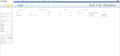 VSA-vSphere1 is unsynchronized
 -
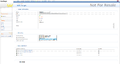 Change the priority of the rest synchronisation for the target
 -
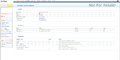 The VSA can be restarted under "System Power"
 -
 Perform a restart


Target offline
If the connection between the SvSAN nodes in a cluster without a neutral storage host (NSH) is lost, for example due to a defect in the switch, network card, or cables, this is referred to as a split-brain scenario. Once the connection has been reestablished, both nodes are unsynchronized and the target is set to offline status to prevent data inconsistency.
Hint: Before you perform the following steps, you should find out the cause for the split-brain situation. Verify, if all connections between the nodes and perform on every VSA interface ping tests to make sure that there is a safe connection between the hosts. We recommend the configuration of a NSH for the cluster to avoid this scenario and possible data loss.
Break Mirror plex
The recommended process of StorMagic is to break the open mirrored target. This merely removes the mirroring effect and the local raid is added as single iSCSI target to the respective node as datastore. Therefore, you have the possibility to verify and secure the data of both systems so that no data is lost. The target with the most recent status can then be mirrored again and made available to both hosts.
With this process, you have the possibility to secure and verify all data before the complete synchronisation. If no NSH was configured, we recommend this procedure.
-
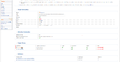 Select under "Target" a Target Plex
 -
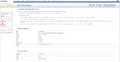 Select "Break" to remove the mirroring
 -
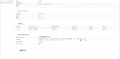 Name the unmirrored target and add an initiator
 -
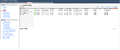 Perform a rescan in the vSphere Client / Web Client
 -
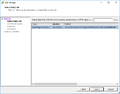 The new target can be added as a datastore for backup/verification purposes.
 -
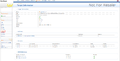 Select the “Mirroring” option for the target to mirror a target again.
 -
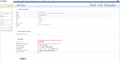 Add the host to which you want to mirror


Force synchronization
It is also possible to force a synchronisation. Please verify at both Target Plexes, how much data is to be synchronized. In this example, VSA-vSphere1 has 105 KB of data that needs to be synchronized to VSA-vSphere2, and VSA-vSphere2 has 70,189 MB of data that needs to be synchronized to VSA-vSphere1. The synchronisation is started from VSA-vSphere2 in this example, since it has a more up-to-date database than VSA-vSphere1, a complete synchronization with VSA-vSphere1 is started.
In this example, the entire data set is synchronized from VSA-vSphere2 to VSA-vSphere1. The 105 KB from VSA-vSphere1 is lost data if it has not been backed up.
-
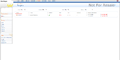 Select the offline target
 -
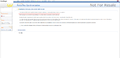 Check the amount of data that needs to be synchronized on both VSAs
 -
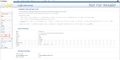 Select “Force Synchronized” to synchronize data from one VSA to the other VSA
 -
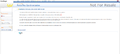 Check the box and confirm with "Yes"
 -
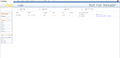 After the synchronisation, the target is available again


Author: Sebastian Köbke
 |
Translator: Alina Ranzinger Alina has been working at Thomas-Krenn.AG since 2024. After her training as multilingual business assistant, she got her job as assistant of the Product Management and is responsible for the translation of texts and for the organisation of the department.
|
