

 wiki
wikiInstallation of Thomas-Krenn PCI fan kit
In this article, we show you how to install the Thomas-Krenn PCI fan kit.
The PCI fan kit consists of:
- 1x PCI fan holder including fastening material
- 1x silent fan

You will find step by step instructions for the installation of the PCI fan kit in the following gallery:
-
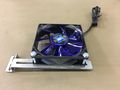 step 1: Fasten the fan onto the long rail of the holder using the screws provided. Please note that the fan blows downwards.
 -
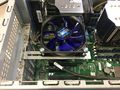 step 2: Now, you can fasten the holder and the fan on the PCI slot covers
 -
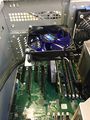 step 3: Pay attention to the position of the kit. The fan should be located directly above the component to be cooled.


 |
Author: Armin Oberneder Armin Oberneder has been working for Thomas-Krenn.AG for over 7 years now. He is currently employed in the consulting team and thus takes care of all customer-specific inquiries concerning servers, storage, virtualization and networks. In the past years Armin has specialized in Windows Server, Software-Defined-Technologies and Network Technology. Due to these specializations, he also ensures that our customers are helped as quickly as possible in the event of problems by means of a ticket system, by telephone or in writing via e-mail.
|
 |
Translator: Alina Ranzinger Alina has been working at Thomas-Krenn.AG since 2024. After her training as multilingual business assistant, she got her job as assistant of the Product Management and is responsible for the translation of texts and for the organisation of the department.
|





