

 wiki
wikiCharset settings on Supermicro HTML5 iKVM
Supermicro Remote HTML iKVM consoles only support the US keyboard layout (US character set). When using a German keyboard layout, special characters are displayed as other characters. This article describes how you can work around the problem by using the US keyboard layout, using Alt codes, or switching to the Java interface.
Problem
When using the German QWERTZ keyboard layout, it is noticeable that the entries on the host's keyboard are not passed on 1:1 to the target system. For example, when entering a '+' away from the numeric keypad, '=' is output on the target system and vice versa.
Cause
The problem is caused by the HTML5 iKVM console that only supports the US international keyboard layout.
Possible workarounds
- Use the US keyboard layout
- Use ALT-Codes in the HTML-iKVM console (an overview can be found here: Helpful Alt codes)
- Switching to the Java interface
Perform the following steps to switch from iKVM to Java:
-
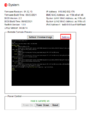 To change the interface used, select “Settings” in Remote Preview.
 -
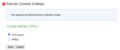 After this, change the interface to "Java plug-in" and safe the changes.
 -
 A new .jnlp-file is downloaded from now on in every session that is used for opening the remote control.


 |
Translator: Alina Ranzinger Alina has been working at Thomas-Krenn.AG since 2024. After her training as multilingual business assistant, she got her job as assistant of the Product Management and is responsible for the translation of texts and for the organisation of the department.
|





