

 wiki
wikiHow to erase hard drives completely
In this article, we describe how to format/delete hard disks completely. This means that you can be sure that nobody has access to your old data anymore.
Instructions
Before your start with the instructions, you have to complete the hard disks onboard or via HBA. Otherwise, DBAN does not recognize the hard disks.
-
![1. First, download the DBAN ISO-image. The download can be found here:[1].](//www.thomas-krenn.com/de/wikiDE/images/thumb/4/42/1432302104_old-go-bottom.png/120px-1432302104_old-go-bottom.png) 1. First, download the DBAN ISO-image. The download can be found here:[1].
1. First, download the DBAN ISO-image. The download can be found here:[1]. -
 2. After this, burn the ISO image to a CD.
 -
 3. Now insert the burned CD into a CD/DVD drive and start the boot menu of your motherboard.
 -
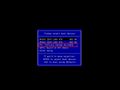 4. Select your CD/DVD-drive from the various options.
 -
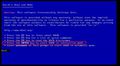 5. After you have selected your drive, you will get to the start-menu "Darik's Boot And Nuke". Press the “Enter” key to enter “interactive mode” (the loading process may take a while).
 -
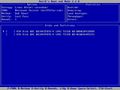 6. In Interactive mode, you can now use the arrow keys and the space bar to select the hard drives you want to delete.
 -
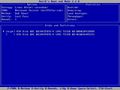 7. When you have selected your hard disks (the first one was selected in this example), you can start formatting using the F10 key.
 -
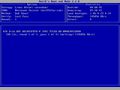 8. If you have started the process with F10, you will get to this overview. As soon as the process is completed, the program closes itself automatically.
![1. First, download the DBAN ISO-image. The download can be found here:[1].](/en/wiki/File:1432302104_old-go-bottom.png)


.jpg)


More information
- Darik's Boot And Nuke (www.dban.org)
- Darik's Boot And Nuke (de.wikipedia.org)
 |
Translator: Alina Ranzinger Alina has been working at Thomas-Krenn.AG since 2024. After her training as multilingual business assistant, she got her job as assistant of the Product Management and is responsible for the translation of texts and for the organisation of the department.
|
Related articles
Nextcloud Talk - chats & conferences ( audio / video )
Nextcloud User Interface (UI) - overview
Registration of partner products
