

 wiki
wikiESXi VM importer - Proxmox VE Storage Plugin
This article shows how to import VMware ESCI VMs via Import-Wizard in Proxmox VE. This procedure facilitates the migration and the change from ESXi to Proxmox VE.
Important hint
- For live restore, the VM must be powered off on the ESXi side, otherwise an error will occur if the “Live Restore” checkbox is enabled. Live restore works a little differently here: Proxmox VE immediately starts the image on the PVE server after the VM on ESXi is turned off and you click “Import.” The VM then fetches the data it needs on demand, for example, for a successful boot, etc.
- If a VM does not start immediately despite live restore, you can restart the VM during the live restore import (without interrupting live restore).
- The safest approach is to stop VMs on the ESXi side for import and not to use “live restore”: Background information from Proxmox Server Solutions GmbH: "Note: If the import fails, all data written since the start of the import will be lost. For this reason, we recommend testing this mechanism on a test VM and not using it in networks with low bandwidth and/or high error rates."
Configuration
The configuration of ESXi as PVE storage can be made via Datacenter | Storage.
-
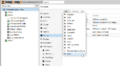 Add: add ESXi
 -
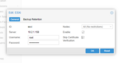 Enter ID, server, user, and password


Import
The actual import and listing of all VMs on the ESXi server is started via the new storage item ESXi in the left menu bar of the Proxmox VE interface.
-
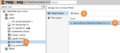 import VM from ESXi - ESXi Storage View
 -
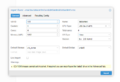 The VM definition is applied and matched to be pve-compatible.
 -
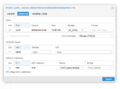 Advanced configurations can be useful
 -
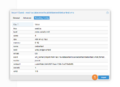 overview of the import (Config)
 -
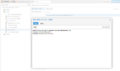 The import process starts


.png)
.png)

Post-Migration ToDos
Some follow-up work is recommended to ensure that the VMs function optimally after migration:[1]
- Update the network settings. The name of the network adapter has most likely changed.
- Install any missing drivers. This is mainly relevant for Windows VMs; download the VirtIO ISO and mount it. How to switch the boot drive to VirtIO after installing the driver is documented in the Proxmox Wiki.[2]
References
- ↑ Migrate to Proxmox VE - Post Migration (pve.proxmox.com/wiki)
- ↑ Paravirtualized Block Drivers for Windows
 |
Author: Jonas Sterr Jonas Sterr has been working for Thomas-Krenn for several years. Originally employed as a trainee in technical support and then in hosting (formerly Filoo), Mr. Sterr now mainly deals with the topics of storage (SDS / Huawei / Netapp), virtualization (VMware, Proxmox, HyperV) and network (switches, firewalls) in product management at Thomas-Krenn.AG in Freyung.
|
 |
Translator: Alina Ranzinger Alina has been working at Thomas-Krenn.AG since 2024. After her training as multilingual business assistant, she got her job as assistant of the Product Management and is responsible for the translation of texts and for the organisation of the department.
|





