

 wiki
wikiCreation of Proxmox Ubuntu 24.04 server VM
This article shows the Installation of a virtual machine with Ubuntu 24.04 LTS on a Proxmox VE 8.2 system. The installed VM can also be used as base for a Cloud Init Template[1] (also view Cloud Init Templates in Proxmox VE - Quickstart).
Creation of virtual machine
-
 Log in to Proxmox VE Webinterface and click on Create VM.
 -
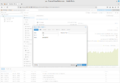 Choose a name for the VM and click on Advanced if you want to see further information.
 -
 Click on Next.
 -
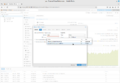 Select the desired ISO Image (view also Proxmox ISO Upload) for the installation.
 -
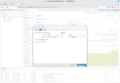 Click on Next.
 -
 Adjust the system options as needed and click on Next.
 -
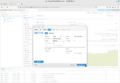 Select the desired size of the virtual drive and click on Next.
 -
 Überprüfen Sie den gewählten CPU Typ und klicken Sie auf Next.
 -
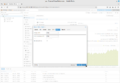 Wählen Sie die gewünschte Größe des Arbeitsspeichers und klicken Sie auf Next.
 -
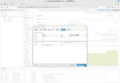 Wählen Sie das gewünschte Netzwerk und klicken Sie auf Next.
 -
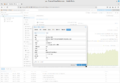 Überprüfen Sie die Einstellungen und klicken Sie auf Finish.


Installation of Ubuntu in guest system
-
 Select the VM you just created on the left and click on Start.
 -
 Click on Console.
 -
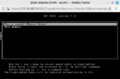 The installation starts.
 -
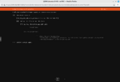 This screenshot shows the drive for the installation.
 -

-
 The installation is completed.
 -

-

-
 The virtual machine with Ubuntu is now running.


Installation of qemu-guest-agent
Last, install the qemu-guest-agent in the virtual machine:[2]
sudo apt install qemu-guest-agent
systemctl start qemu-guest-agent
systemctl enable qemu-guest-agent
Activate the agent by selecting the option Use QEMU Guest Agent so that it is used by Proxmox:

References
- ↑ Cloud-Init Support (pve.proxmox.com)
- ↑ Qemu-guest-agent (pve.proxmox.com)
 |
Author: Werner Fischer Werner Fischer, working in the Knowledge Transfer team at Thomas-Krenn, completed his studies of Computer and Media Security at FH Hagenberg in Austria. He is a regular speaker at many conferences like LinuxTag, OSMC, OSDC, LinuxCon, and author for various IT magazines. In his spare time he enjoys playing the piano and training for a good result at the annual Linz marathon relay.
|
 |
Translator: Alina Ranzinger Alina has been working at Thomas-Krenn.AG since 2024. After her training as multilingual business assistant, she got her job as assistant of the Product Management and is responsible for the translation of texts and for the organisation of the department.
|





