

 wiki
wikiCreating a log file for the RI2212+
You can create a diagnostic file for a RI2212+ server for diagnostic purposes. When you contact us for support, one of our employees may ask you to send us this diagnostic file.
Diagnostic file
System Debug Log
The System Debug Log creates a ZIP archive with a HTML document with extensive information on firmware versions and installed hardware.
The file can be created as follows:
- In the menu on the left, select the section System Diagnostics.
- With the final click on Generate Log, you can create the diagnostic file.
The following pictures show the individual steps:
-
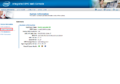 Click on System Diagnostics
 -
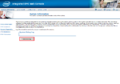 Click on Generate Log
 -
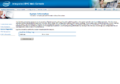 Report is generated
 -
 Logs were generated


Content

The System Debug Log contains the following areas:
- CPU Registers and PCI Configuration Space Dump
- BMC Configuration Data File Hex Dump
- BIOS POST CODE Readings
- SMIBIOS Table
- General BMC Status
- BMC Network Interfaces
- Power Supply Blackbox Data
- Power Supply PEC feature support status
- General System Eventlog
- General BMC Sensor Readings
The following file is an example of a system information report:
 |
Translator: Alina Ranzinger Alina has been working at Thomas-Krenn.AG since 2024. After her training as multilingual business assistant, she got her job as assistant of the Product Management and is responsible for the translation of texts and for the organisation of the department.
|





