

 wiki
wikiOPNsense LTE connection
| Please note that this article / this category refers either on older software / hardware components or is no longer maintained for other reasons. This page is no longer updated and is purely for reference purposes still here in the archive available. |
|---|

The OPNsense Firewall supports multiple modems for mobile Internet connections. This article shows how to configure a mobile internet connection using a LES compact 4L with Quectel EG25-G modem using OPNsense 19.7.
Important note
Since OPNsense 24.7 there are more and more reports of problems with OPNsense and internal LTE modems. Our own tests confirm that a configuration of Thomas-Krenn LES v4 with built-in Quectel EM12-G still worked with OPNsense 24.1. Since the change to 24.7, there are error messages in the log and the modem can no longer obtain an IP address via LTE. We therefore advise against using these modems. Use external LTE/5G gateways instead.
OPNsense error messages in the log
The following excerpt from the debug log shows the problem. You can find this log under Interfaces -> Point-to-Point -> Log File. Then switch the display to Debug at the top:
2025-02-12T12:17:03	Informational	ppp	 [opt1_link0] Link: reconnection attempt 1
2025-02-12T12:17:00	Informational	ppp	 [opt1_link0] Link: reconnection attempt 1 in 3 seconds
2025-02-12T12:17:00	Informational	ppp	 [opt1_link0] LCP: Down event
2025-02-12T12:17:00	Informational	ppp	 [opt1_link0] Link: DOWN event
2025-02-12T12:17:00	Informational	ppp	 [opt1_link0] MODEM: chat script failed
2025-02-12T12:17:00	Informational	ppp	 [opt1_link0] CHAT: line 391: label "MomIdentGeneriicc" not found
2025-02-12T12:17:00	Informational	ppp	 Label 'MomIdentGeneriicc' not found
2025-02-12T12:17:00	Informational	ppp	 [opt1_link0] LCP: LayerStart
2025-02-12T12:17:00	Informational	ppp	 [opt1_link0] LCP: state change Initial --> Starting
2025-02-12T12:17:00	Informational	ppp	 [opt1_link0] LCP: Open event
2025-02-12T12:17:00	Informational	ppp	 [opt1_link0] Link: OPEN event
2025-02-12T12:17:00	Informational	ppp	 [opt1] Bundle: Interface ng0 created
2025-02-12T12:17:00	Informational	ppp	 web: web is not running
2025-02-12T12:17:00	Informational	ppp	 process 72266 started, version 5.9
2025-02-12T12:17:00	Informational	ppp
2025-02-12T12:17:00	Informational	ppp	 Multi-link PPP daemon for FreeBSD
Open issue at OPNsense
There is also an issue on OPNsense: Quectel LTE MODEM not working starting with 24.7 (github.com)
Supported modems
OPNsense basically supports the same modems as FreeBSD/HardenedBSD. The following modems have been tested by the OPNsense developers:[1]
- Huawei ME909u-521 (device cuaUx.0) - this modem is available at Thomas-Krenn when buying a LES network+ or LES v3 directly in the webshop
- Quectel EG25-G (device cuaUx.2) - this modem will soon be available from Thomas-Krenn when purchasing an LES compact 4L in the webshop
- Huawei E220 (device cuaUx.0)
- Sierra Wireless MC7304 (device cuaUx.2)
Install SIM card
Before configuration, equip the modem with a SIM card. Depending on the system used, the SIM card slot is located on the mainboard (e.g. LES v3, LES network+)[2] or on the back of the modem (Quectel EG-25G with Sim card slot).
After installing the SIM card, start the OPNsense system.
Configure modem
Perform the following configuration steps:
-
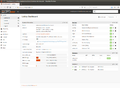 Dashboard view after OPNsense installation.
 -
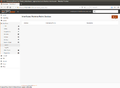 Go to Interfaces -> Point-to-Point -> Devices and click on Add in the upper right corner.
 -
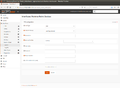 The corresponding dialog appears.
 -
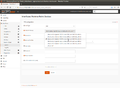 Select the entry /dev/cuaU0.2 for a Quectel EG25-G modem, /dev/cuaU0.2 for a Huawei ME909u-521 /dev/cuaU0.0.
 -
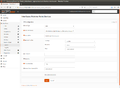 Select your provider settings.
 -
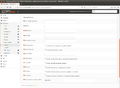 If required, set options such as a PIN code under Advanced Options (unless you have deactivated this on the SIM card).
 -
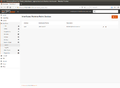 After clicking on Save the new device is displayed.


Change the WAN connection
To permanently use the mobile Internet connection as the only WAN uplink, carry out the following steps:
-
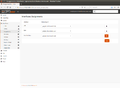 Go to Interfaces -> Assignments.
 -
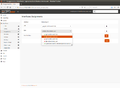 Now select PPP0 for the WAN connection.
 -
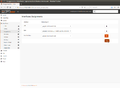 Click on Save.
 -
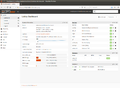 The new mobile WAN IP address is now visible in the dashboard.


Reset WAN connection
If the WAN connection is to be reset to a normal network connection, the PPP connection must be deactivated:
-
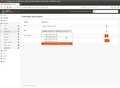 Go to Interfaces -> Assignments.
 -
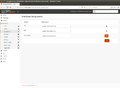 Save the setting.
 -
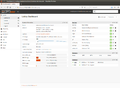 At first no WAN IP address is visible.
 -
![Go to Interfaces -> [WAN] and select the desired IPv4 Configuration Type instead of PPP, e.g. DHCP.](//www.thomas-krenn.com/de/wikiDE/images/thumb/0/04/04_WAN_Interfaces.png/120px-04_WAN_Interfaces.png) Go to Interfaces -> [WAN] and select the desired IPv4 Configuration Type instead of PPP, e.g. DHCP.
Go to Interfaces -> [WAN] and select the desired IPv4 Configuration Type instead of PPP, e.g. DHCP. -
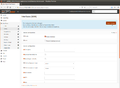 After saving click on Apply Changes.
 -
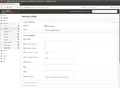 The settings are then applied.
 -
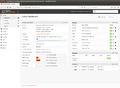 Now the desired WAN IP address appears again in the dashboard.


![Go to Interfaces -> [WAN] and select the desired IPv4 Configuration Type instead of PPP, e.g. DHCP.](/en/wiki/File:04_WAN_Interfaces.png)


References
- ↑ Interface configuration - Supported Devices (docs.opnsense.org)
- ↑ Equip mini server with SIM card. (it-administrator.de)
 |
Author: Werner Fischer Werner Fischer, working in the Knowledge Transfer team at Thomas-Krenn, completed his studies of Computer and Media Security at FH Hagenberg in Austria. He is a regular speaker at many conferences like LinuxTag, OSMC, OSDC, LinuxCon, and author for various IT magazines. In his spare time he enjoys playing the piano and training for a good result at the annual Linz marathon relay.
|





