

 wiki
wikiNextcloud Appcenter
Nextcloud provides a lot of features in its base configuration with files, photos, talk and an extensive contact and calendar administration. Nextcloud, however, is expandable with a lot of plugins. This allows you to greatly expand and extend the range of functions.
Important hint: Lots of findable expansions in the Appcenter are not continously updated by their creators. This can cause problems with updates, meaning that they either no longer work, contain errors, or may need to be deactivated by you again, or may even have been automatically deactivated due to serious errors. The Featured Apps are applications that are officially recommended by the Nextcloud developers, but do not necessarily have to originate from the Nextcloud developers.
Featured Apps: Featured Apps are recommended applications, which you can install and activate in your Nextcloud-Instance. Thomas-Krenn also recommends primarily the use of Featured Apps, if other apps are required.
Appcenter overview
-
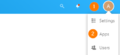 How to access the App Center. You will need an administrator account to do this. Regular users do not have the rights to download and activate applications.
 -
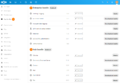 App-Bundles enable the quick activation of multiple applications, but also individual Bundle-Apps can be downloaded and enabled afterwards.
 -
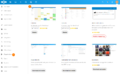 You can install individual applications via the individual categories. Untested apps may contain potential errors in your Nextcloud instance or may not function correctly.


App installation
-
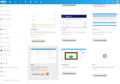 To install an app you have found, click on "Download and enable".
 -
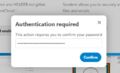 You have to enter your admin password again for safety reasons.
 -
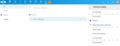 New installed apps can be found in the Nextcloud app bar. Enjoy your new Nextcloud extension!


 |
Author: Jonas Sterr Jonas Sterr has been working for Thomas-Krenn for several years. Originally employed as a trainee in technical support and then in hosting (formerly Filoo), Mr. Sterr now mainly deals with the topics of storage (SDS / Huawei / Netapp), virtualization (VMware, Proxmox, HyperV) and network (switches, firewalls) in product management at Thomas-Krenn.AG in Freyung.
|
 |
Translator: Alina Ranzinger Alina has been working at Thomas-Krenn.AG since 2024. After her training as multilingual business assistant, she got her job as assistant of the Product Management and is responsible for the translation of texts and for the organisation of the department.
|





