

 wiki
wikiConfigure and create mail notifications in Proxmox VE
Using the Web UI or the command line, there are several ways to configure **email notifications** for the secure operation of Proxmox VE. This article explains the current **configuration and testing options** for these notifications in Proxmox VE 8.1.
Basic Information
By default, Proxmox VE sends all emails to the address associated with the user root@pam. This can be viewed under Datacenter -> Permissions -> Users.

Datacenter Notifications
Since Proxmox VE 8.1, notifications can be configured globally at the datacenter level.
Notification Targets
Three configurable **notification targets** are available:
- Gotify Server
- SMTP
- Sendmail (default)
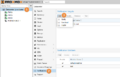
Gotify (notification server) and the ability to send emails via a specified SMTP account (including SSL/TSL and user/password authentication) are new features (see graphic: Notification Targets in PVE 8.1).
Notification Matchers
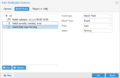
Once one or more notification targets are configured, additional notification matchers can be defined. These rules determine how notifications are routed to specific targets. For instance, you could set notifications to be sent to support@company.com from Monday to Friday and to oncall@company.com during weekends. Thanks to regex and various filters, there are numerous possibilities for customizing notifications. In the graphic "Notification Targets in PVE 8.1," notifications of type "fencing" with severity "Warning" or "Error" are sent to a specific notification target on Saturdays and Sundays between 00:00 and 23:59.
Sending a Test Notification
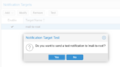
In the Datacenter Notifications section, a test email can be sent to a specific notification target by selecting it and clicking "Test" (see graphic: Test-Notification in PVE 8.1).
-
 Notification Targets in PVE 8.1
 -
 Test-Notification in PVE 8.1
 -
 Notification Matchers in PVE 8.1


Notification Overview
An overview of events that trigger email notifications is available in the Proxmox VE documentation [1]:
| Event | Type | Severity | Metadata fields (in addition to type) |
|---|---|---|---|
| System updates available | package-updates | info | hostname |
| Cluster node fenced | fencing | error | hostname |
| Storage replication failed | replication | error | - |
| Backup finished | vzdump | info (error on failure) | hostname |
| Mail for root | system-mail | unknown | - |
| Field name | Description |
|---|---|
| type | Type of the notification |
| hostname | Hostname, including domain (e.g., pve1.example.com) |
For many other events, notifications are still necessary. Below is the configuration for ZFS email notifications and an overview of various monitoring tools that can monitor Proxmox VE 8.1, including Ceph.
ZFS Email Notifications
If you are using ZFS, it makes sense to receive notifications for ZFS errors. The following settings can be applied:
apt install zfs-zed &&
nano /etc/zfs/zed.d/zed.rc

# Adjust the email address accordingly
ZED_EMAIL_ADDR="root"

# Set for temporary testing
ZED_NOTIFY_VERBOSE=1

systemctl reload-or-restart zed.service
To test, use the following scenario:
cd /tmp
dd if=/dev/zero of=sparse_file bs=1 count=0 seek=512M
zpool create test /tmp/sparse_file
zpool scrub test
You should then receive an email indicating that the scrubbing of test has completed. To clean up, delete the temporary pool:
zpool export test
rm /tmp/sparse_file
Ceph Email Notifications
When using Ceph with Proxmox VE, you will not receive email notifications about Ceph issues by default. Some errors are displayed on the Proxmox VE Ceph dashboard, but no email is sent. We recommend setting up email notifications via one of the monitoring solutions in our overview table.
Overview of Monitoring Solutions
Here is an overview of available tools. For CheckMK and Grafana with InfluxDB2, we provide dedicated guides:
| Tool | Cost | Open-Source | Predefined Checks | Checks (Singlehost) | Checks (Cluster) | Checks (Ceph) | Checks (ZFS) | Wiki Article | |
|---|---|---|---|---|---|---|---|---|---|
| Checkmk RAW Edition | Free | Yes (Github) | Yes (via User Interface) | x | x | x | x | ||
| Nagios/Icinga | Free | Yes (Github) | Yes (Third Party) | Not tested | Not tested | Not tested | Not tested | ||
| Zabbix | Free | Yes (Github) | Yes (Github) | Yes (Tutorial, Third Party) | Not tested | Not tested | Not tested | Not tested | |
| PRTG | Free(1) | No | No (only via snmpd) | Not tested | Not tested | Not tested | Not tested | ||
| Grafana | Free | Yes (Github) | Yes (Third Party) | Better suited for live monitoring of VMs and host resources. | |||||
(1) Free up to 100 checks/sensors
 |
Author: Jonas Sterr Jonas Sterr has been working for Thomas-Krenn for several years. Originally employed as a trainee in technical support and then in hosting (formerly Filoo), Mr. Sterr now mainly deals with the topics of storage (SDS / Huawei / Netapp), virtualization (VMware, Proxmox, HyperV) and network (switches, firewalls) in product management at Thomas-Krenn.AG in Freyung.
|





