

 wiki
wikiAddition of nodes to TrueCommand
A cluster volume allows you to share data across multiple systems. This gives you read and write access to all selected disks from any system. This takes place through the Creation of a Storage Pool. This article explains how to create a cluster volume under TrueNAS scale.
Requirements:
- TrueCommand server or VM
- TrueNAS Core / TrueNAS Scale server or VM
Addition of nodes and creation of cluster volume
-
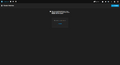 This view should be displayed in your TrueCommand web interface when you start up.
 -
![Now click on the [gear icon] in the top right corner, then select the [Dashboard] tab.](//www.thomas-krenn.com/de/wikiDE/images/thumb/2/25/2_Dashboard.png/120px-2_Dashboard.png) Now click on the [gear icon] in the top right corner, then select the [Dashboard] tab.
Now click on the [gear icon] in the top right corner, then select the [Dashboard] tab. -
![This display should appear. Here, you only have to click on [New System] to add a new system into your cluster.](//www.thomas-krenn.com/de/wikiDE/images/thumb/6/66/3_New_system.png/120px-3_New_system.png) This display should appear. Here, you only have to click on [New System] to add a new system into your cluster.
This display should appear. Here, you only have to click on [New System] to add a new system into your cluster. -
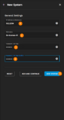 In this window, you must enter the IP address or host name of the desired node. You must also assign a nickname and a password. The nickname can also correspond to the host name of the node. Repeat this process until all desired nodes have been added.
 -
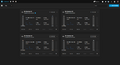 The added nodes should then be displayed in this view and all should be in the started state.

![Now click on the [gear icon] in the top right corner, then select the [Dashboard] tab.](/en/wiki/File:2_Dashboard.png)
![This display should appear. Here, you only have to click on [New System] to add a new system into your cluster.](/en/wiki/File:3_New_system.png)


 |
Author: Niklas Pauli Niklas Pauli works in the product management team at Thomas-Krenn. He completed his general university entrance qualification at Freyung High School and then his training as an IT specialist for system integration at Thomas-Krenn.AG. After completing his training, he continued to work in the areas of Proxmox VE incl. Ceph, backup (Proxmox, Veeam, SEP). He is also a regular writer for the Thomas-Krenn-Wiki.
|

 |
Translator: Alina Ranzinger Alina has been working at Thomas-Krenn.AG since 2024. After her training as multilingual business assistant, she got her job as assistant of the Product Management and is responsible for the translation of texts and for the organisation of the department.
|





