

 wiki
wikiAIC backplane firmware- and MFG-update via serial console
This article describes how to update the AIC backplane firmware and MFG using a serial console connection.
Hardware requirements

The following two cables are needed:
-
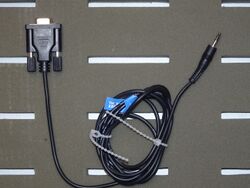 1.: Serial cable with 3,5-mm auxiliary connector (male)
 -
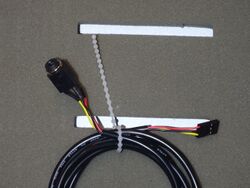 2.: AUX to JEXP_UART adapter. This is included in the accessories for a Thomas Krenn server or is already pre-installed in the system.


A secondary system (for example a laptop or neighboring server) is recommended for the flashing procedure.
Connection between backplane and secondary system
The JEXP_UART-header on the backplane consists of six pins. However, only the upper three pins are needed for flashing.


The other end must be connected to the secondary system via serial port.

Establishing a connection
Programs such as PuTTY or ExtraPutty are required to establish a connection. Due to its expanded data transfer options, ExtraPuTTY is highly recommended.
The following parameters need to be set:
| Parameter | Value |
|---|---|
| Speed (baudrate) | 38400 |
| Data Bits | 8 |
| Stop Bits | 1 |
| Parity | none |
| Flow Control | none |
-
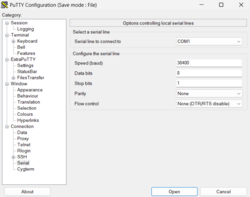 Settings for establishing a connection with the backplane in ExtraPuTTY
 -
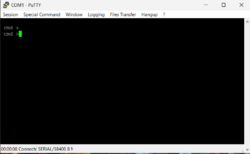 Live session. After clicking the Enter-key, 'cmd >' should appear.


Checking active firmware / MFG
The commands rev and showmfg can be used to check the installed firmware and MFG versions.
-
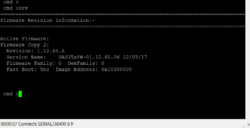 The rev command displays the current firmware version.
 -
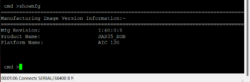 The showmfg command displays the currently installed MFG version.


Flashing the backplane
Precautions
To ensure that the backplane is functioning properly and that there are no hardware defects or similar issues, you should run a few commands and check the results before actually flashing the device.
-
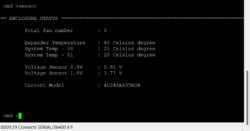 The sensor command can be used to get information about temperature, connected fans or voltage.
 -
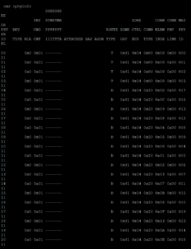 The phyinfo displays information about the connected storage devices (none are installed in the screenshot).
 -
![With the counters command, different error counter values are displayed. The values nvWrdCnt, DispErrCnt, LossSyncCnt and RstSeqFailCnt need to be 0. If this is not the case, counters reset can be used to reset all values. Then execute the counters command again. If the values are not zero, it is likely that there is a defect. [1]](//www.thomas-krenn.com/de/wikiDE/images/thumb/d/da/Counters.png/191px-Counters.png) With the counters command, different error counter values are displayed. The values nvWrdCnt, DispErrCnt, LossSyncCnt and RstSeqFailCnt need to be 0. If this is not the case, counters reset can be used to reset all values. Then execute the counters command again. If the values are not zero, it is likely that there is a defect. [1]
With the counters command, different error counter values are displayed. The values nvWrdCnt, DispErrCnt, LossSyncCnt and RstSeqFailCnt need to be 0. If this is not the case, counters reset can be used to reset all values. Then execute the counters command again. If the values are not zero, it is likely that there is a defect. [1]


![With the counters command, different error counter values are displayed. The values nvWrdCnt, DispErrCnt, LossSyncCnt and RstSeqFailCnt need to be 0. If this is not the case, counters reset can be used to reset all values. Then execute the counters command again. If the values are not zero, it is likely that there is a defect. [1]](/en/wiki/File:Counters.png)
Firmware update[1]
-
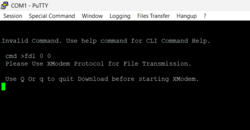 The fdl 0 0 command sets the backplane into update mode. It now expects a firmware file.
 -
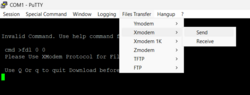 The Xmodem protocol is to be used for file transfer. In ExtraPuTTY, this can be done via 'File Transfer → Xmodem → Send'
 -
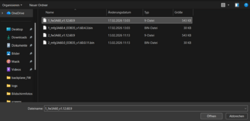 Afterwards, select the desired firmware file.
 -
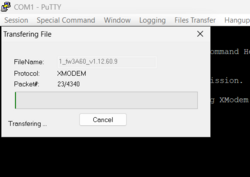 Upload and flash procedure starts automatically.
 -
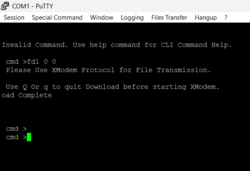 Once the process is complete, the message "Upload successful" appears.


MFG-update[1]
Updating the MFG works similar to the firmware.
-
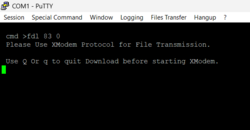 The update is started with the fdl 83 0 command.
 -
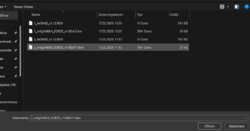 Select the correct mfg-file.
 -
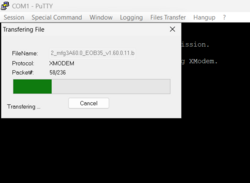 Data transfer begins.


After the updates
If no storage devices are connected to any backplane, the update can be completed by executing the reset command.

Attention! If the reset command is executed while data storage devices with an active RAID array are connected to the backplane, this may cause the RAID to degrade or fail completely.

References
 |
Author: Simon Wolf Simon has been working as a hardware technician at Thomas-Krenn.AG since 2022. Mainly, he is responsible for repairing our customers and internal servers as well as all kinds of subjects revolving around hardware in general.
|





