

 wiki
wikiRecreate Linux root password
If the root password of a Linux system has been forgotten, a new password with different methods can be set. In this article, we explain how to set a new password with these methods.
Method 1: start /bin/bash
A Bash-Shell is immediately started with the following method. We have tested this process with Debian 8:
-
![1. In Grub, select with the help of the [arrow keys] the desired boot entry (This is usually the one that is automatically preselected.).](//www.thomas-krenn.com/de/wikiDE/images/thumb/0/09/Linux-Root-Passwort-Recovery-01-Grub-2.02.png/120px-Linux-Root-Passwort-Recovery-01-Grub-2.02.png) 1. In Grub, select with the help of the [arrow keys] the desired boot entry (This is usually the one that is automatically preselected.).
1. In Grub, select with the help of the [arrow keys] the desired boot entry (This is usually the one that is automatically preselected.). -
![2. Click on [e] to edit the entry. The boot parameters will appear as shown in the example.](//www.thomas-krenn.com/de/wikiDE/images/thumb/e/ee/Linux-Root-Passwort-Recovery-02-Grub-Edit.png/120px-Linux-Root-Passwort-Recovery-02-Grub-Edit.png) 2. Click on [e] to edit the entry. The boot parameters will appear as shown in the example.
2. Click on [e] to edit the entry. The boot parameters will appear as shown in the example. -
![3. Use the [arrow keys] to select the kernel line (linux) and press the [End] key to jump to the end of the line. Add init=/bin/bash (separated by a space before the preceding parameter). Press [F10] to boot the entry.](//www.thomas-krenn.com/de/wikiDE/images/thumb/2/2c/Linux-Root-Passwort-Recovery-03-add-bin-bash.png/120px-Linux-Root-Passwort-Recovery-03-add-bin-bash.png) 3. Use the [arrow keys] to select the kernel line (linux) and press the [End] key to jump to the end of the line. Add init=/bin/bash (separated by a space before the preceding parameter). Press [F10] to boot the entry.
3. Use the [arrow keys] to select the kernel line (linux) and press the [End] key to jump to the end of the line. Add init=/bin/bash (separated by a space before the preceding parameter). Press [F10] to boot the entry. -
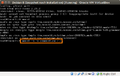 4. The root-file system is now integrated in read-only. Now mount it as writable (rw) with this command:
mount -n -o remount,rw / / -
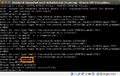 5. Set the new password with
passwd -
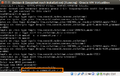 6. Set the file system back on read-only, so that it is in a consistent condition before the reboot:
mount -n -o remount,ro / / -
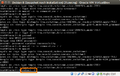 7. Restart the system with
reboot -f. The forced reboot (-f option) is required, because without the init daemon, a normal reboot is not possible.
![1. In Grub, select with the help of the [arrow keys] the desired boot entry (This is usually the one that is automatically preselected.).](/en/wiki/File:Linux-Root-Passwort-Recovery-01-Grub-2.02.png)
![2. Click on [e] to edit the entry. The boot parameters will appear as shown in the example.](/en/wiki/File:Linux-Root-Passwort-Recovery-02-Grub-Edit.png)
![3. Use the [arrow keys] to select the kernel line (linux) and press the [End] key to jump to the end of the line. Add init=/bin/bash (separated by a space before the preceding parameter). Press [F10] to boot the entry.](/en/wiki/File:Linux-Root-Passwort-Recovery-03-add-bin-bash.png)


Method 2: start from a installation medium
Alternatively, you can start the affected computer with an installation medium and boot the rescue system from there.
Information on this can be found here for SLES:
- How To: Recover the Linux root password (Novell Knowledgebase, hint for SLES 8/9/10/11)
Method 3: start single user mode
The Single User Mode is an opportunity. The system is started in runlevel S[1]. This method functions for older Linux distributions (fWith newer Linux distributions, the current root password must be entered for single-user mode—this method will not work in this case).
A Linux computer with GRUB bootloader is started with the following steps in single user mode:
- Select the desired boot entry (this is usually the one that is automatically preselected) in GRUB with the help of the [arrow keys]
- Click on [e] to edit the entry
- Use [arrow key] to select the kernel line (kernel)
- Click on [e] to edit the kernel line
- Add the word single on the end of this line (separated by a space before the preceding parameter)
- Click on [Esc] to get to the main menu
- Click on [e] to boot the changed entry
- When starting in single user mode, you are automatically taken to a root shell. A new root password can be set with the passwd command.
Methods für CentOS / RHEL
Information on resetting the root password under CentOS or RHEL can be found in the following article:
- Resetting a Forgotten Root Password (wiki.centos.org)
- Recovering Root Password (access.redhat.com)
References
- ↑ Runlevel - Beispiel Linux (de.wikipedia.org)
 |
Author: Werner Fischer Werner Fischer, working in the Knowledge Transfer team at Thomas-Krenn, completed his studies of Computer and Media Security at FH Hagenberg in Austria. He is a regular speaker at many conferences like LinuxTag, OSMC, OSDC, LinuxCon, and author for various IT magazines. In his spare time he enjoys playing the piano and training for a good result at the annual Linz marathon relay.
|
 |
Translator: Alina Ranzinger Alina has been working at Thomas-Krenn.AG since 2024. After her training as multilingual business assistant, she got her job as assistant of the Product Management and is responsible for the translation of texts and for the organisation of the department.
|





