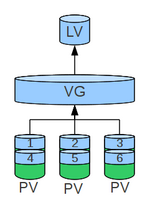
The Logical Volume Manager (LVM) allows an abstracted and flexible administration of data storage of a computer system. Compared to the traditional method using partitions, another higher abstraction layer is introduced that should enable a simpler and more efficient administration and configuration of the data carrier. For example, multiple hard drives can be combined into a logical volume and used as a single data storage unit. Another simplification offers the opportunity to group Logical Volumes in Volume Groups, which can also be given names to. These classifications and naming conventions also provide the administrator with a logical reference to the data stored in the Logical Volumes.
This article shows the implementation of LVM in Linux.
A PV is always represented by a block device, for example a hard drive (Device) or a partition. When a partition or device is initialized as a PV, the block device is marked with an LVM label and populated with metadata. The LVM label identifies the block device as a PV and it includes the Random Unique Identifier (UUID). It stores the size of the devices in bytes and records where the metadata is located.
[1]
Setup PV-VG-LV
The metadata is required for the exact descripiton of the Volume Groups. An identical copy of the metadata is stored on the PVs of a VG by default. When creating a PV, it is possible to define that 0, 1 or 2 copies of metadata are stored. Once this number is defined, it can not be changed anymore. Storing the metadata in multiple locations is intended to prevent accidental overwriting.[2] The size of the metadata area can be also changed when creating a PV. Under circumstances, this area may get too small, which can lead to problems, as this size cannot be changed later: Fix LVM VG vgname metadata too large for circular buffer.
When a PV is created, it is divided into many small, equally sized pieces called Physical Extents (PEs).[3] These PEs are the smallest possible amount of data that can be allocated. By default, it is 4 MiB, but it can be changed when creating the "volume group" that is based on it. Since the lvm2-format, the number of PEs is not limited anymore. According to Man-Page of vgcreate, a high number of PEs can slow down the provided tools. The I/O performance is, however, not affected.
Volume Groups (VGs)
One or more PVs can be summarized to one or more VGs. This VG represents a pool of data storage from which logical volumes can later be allocated.
The storage available of a VG is divided into small, uniformly sized parts, which are Logical Extents. These are the counterparts to the PEs at the PV level. The task of the VG is to assign the Logical Extents to the Physical Extents correctly. By grouping them in an intermediate layer, PEs from different devices can also be combined into a VG.
Logical Volumes (LVs)
VGs are divided into one or more LVs on which the file systems are created. There are three different types of LVs that can be created:
Aufbau eines linearen LVs
Linear Volumes: A well-organized summary of PEs to a LV. The size of the underlying PVs must not be the same. They are forwarded consolidated to the LVs. Furthermore, a LV does not have to consist of a VG. Multiple LVs can be also created from a VG as long as the VG has enough available storage. The sizes of the generated LVs may vary, but they are at least as large as a PE.
Striped Volumes: As with RAID 0, the data in the Logical Volume (LV) is distributed alternately across the Physical Volumes (PVs). This can, under circumstances, increase the performance, but not the reliability.Aufbau eines striped LVs The image "Setup of a striped LV" shows how "Stripes" 1 through 6 are written sequentially to the underlying PVs. In this case, it is possible that individual I/O operations can be performed in parallel, thereby speeding up the write operation.
Mirrored Volumes: Similar to RAID 1, the data is mirrored to the underlying devices. Multiple reflections can also be distributed across different “legs”. The device that should be copied is divided in so-called "Regions" that are synchronized when changes are made. The size of these regions is 512KB by default, but can also be changed.[4]
LVM and Device Mapper
Since the Linux kernel 2.6, LVM is implemented using the device mapper. LVM uses the linear Device Mapper Target.[5]
If the data is distributed across different devices (“striping”), the risk of a disk failure increases. This can only be considered a drawback of LVM itself to a limited extent, since it is actually a design choice made when structuring the storage architecture.
To access the data via Live CDs, they must support LVM management. Generally, the access to LVMs is only supported by Linux at the moment.
The old Grub version could not be used on LVMs. Therefore, a separate, non-LVM boot partition was required. GRUB 2 does not require this anymore.[8]
Instructions and configurations
The following websites are quite helpful when installing and configuring LVMs:
In each individual case, it is necessary to check which LVM tools are being used, since LVM is constantly being further developed. Therefore, new features may be introduced that are not yet available in older versions. You can find out which version of LVM is currently installed as follows:
Alina has been working at Thomas-Krenn.AG since 2024. After her training as multilingual business assistant, she got her job as assistant of the Product Management and is responsible for the translation of texts and for the organisation of the department.


 wiki
wiki