

 wiki
wikiEFI shell USB drive
The EFI shell allows to run EFI applications, such as tools for updating the BIOS or the firmware of network cards or RAID controllers. In a lot of systems, an EFI shell is already included in the BIOS. If an integrated EFI shell is missing, an USB drive with EFI shell can be used as an alternative.
Create USB stick with EFI shell
The following steps must be performed, to create an USB drive with EFI shell:
- Format USB stick with FAT32
- Create /efi/boot directory on USB drive
- Download UEFI shell (Shell.efi) and store it in the /efi/boot/ directory on the USB drive:
- https://github.com/tianocore/edk2/blob/edk2-stable201903/ShellBinPkg/UefiShell/X64/Shell.efi (includes UEFI interactive shell v2.2)
- Rename Shell.efi to Bootx64.efi
Test UEFI shell
Next, you can boot from this USB stick and use the EFI shell:
-
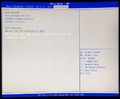 Boot into the BIOS and, under Save & Exit in the Boot Override section, select the UEFI entry for the USB drive you created. (UEFI: Lexar USB Flash Drive ... in this example).
 -
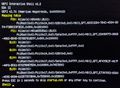 The EFI shell is started.


 |
Author: Werner Fischer Werner Fischer, working in the Knowledge Transfer team at Thomas-Krenn, completed his studies of Computer and Media Security at FH Hagenberg in Austria. He is a regular speaker at many conferences like LinuxTag, OSMC, OSDC, LinuxCon, and author for various IT magazines. In his spare time he enjoys playing the piano and training for a good result at the annual Linz marathon relay.
|
 |
Translator: Alina Ranzinger Alina has been working at Thomas-Krenn.AG since 2024. After her training as multilingual business assistant, she got her job as assistant of the Product Management and is responsible for the translation of texts and for the organisation of the department.
|





