

 wiki
wikiCreating a Network Share in Windows
In this article you will find all the necessary information on how to share files on the network. You will also find a guide on how to connect to the file share from another PC.
In the following gallery you will find the procedure for creating a network share:
-
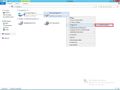 Click Advanced Sharing to create a setup.
 -
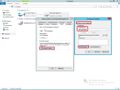 Create the hook in Share this folder, enter the share name and click authorize.
 -
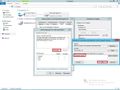 Click Add and then select the users who are allowed to connect to the network.
 -
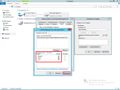 Now select the authorization for the previously selected user.
 -
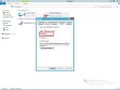 Now you can see the network path and connect to it.


In the following gallery you will find the procedure how to connect to the network share you previously created.
-
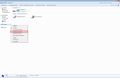 Click Connect to Network Drive.
 -
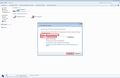 Select the desired drive and then enter the network share path.
 -
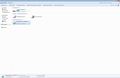 You now have access to the network share.


 |
Author: Armin Oberneder Armin Oberneder has been working for Thomas-Krenn.AG for over 7 years now. He is currently employed in the consulting team and thus takes care of all customer-specific inquiries concerning servers, storage, virtualization and networks. In the past years Armin has specialized in Windows Server, Software-Defined-Technologies and Network Technology. Due to these specializations, he also ensures that our customers are helped as quickly as possible in the event of problems by means of a ticket system, by telephone or in writing via e-mail.
|





