

 wiki
wikiAuto Power On UNO-2271G V2
The UNO-2271G V2 has the option of automatic power on after power supply. For this setting, the server must be opened and a jumper must be positioned differently. The following article shows the procedure for this.
Moving the jumper
-
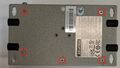 First, the five marked screws in the picture must be removed to open the chassis. These are located on the underside of the device.
 -
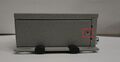 After removing the screws on the bottom of the device, the marked screw on the left side of the case must be removed.
 -
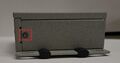 Now, the marked screw on the right must be removed. After removing the screw, the case can be easily opened.
 -
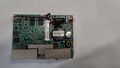 Overview of where the pins are located on the board.
 -
 Jumper is located by default on the right two pins.
 -
 The jumper must now be reconnected to the left two pins to activate the “Auto Power On” function.


Set the Auto Power On function directly in the server configuration
-
![By checking the box next to “Auto Power On (Jumper Setting),” the jumper will be automatically set during the production of your system.[1]](//www.thomas-krenn.com/de/wikiDE/images/thumb/b/b5/SHOP.jpg/120px-SHOP.jpg) By checking the box next to “Auto Power On (Jumper Setting),” the jumper will be automatically set during the production of your system.[1]
By checking the box next to “Auto Power On (Jumper Setting),” the jumper will be automatically set during the production of your system.[1]
![By checking the box next to “Auto Power On (Jumper Setting),” the jumper will be automatically set during the production of your system.[1]](/en/wiki/File:SHOP.jpg)
More information
- User Manual UNO-2271G V2 (www.thomas-krenn.com)
References
- ↑ UNO-2271G-V2 (www.thomas-krenn.com)
 |
Author: Harald Peterhansl Harald Peterhansl has been working at Thomas-Krenn.AG since 2022. As an employee in the Hardware Service department, he is responsible for setting up test environments, testing a wide range of server components, and repairing defective customer systems.
|
 |
Translator: Alina Ranzinger Alina has been working at Thomas-Krenn.AG since 2024. After her training as multilingual business assistant, she got her job as assistant of the Product Management and is responsible for the translation of texts and for the organisation of the department.
|





