wiki
wikiOverland Snapserver komplett resettet
| Hinweis: Bitte beachten Sie, dass dieser Artikel / diese Kategorie sich entweder auf ältere Software/Hardware Komponenten bezieht oder aus sonstigen Gründen nicht mehr gewartet wird. Diese Seite wird nicht mehr aktualisiert und ist rein zu Referenzzwecken noch hier im Archiv abrufbar. |
|---|
In diesem Artikel wird erklärt wie man einen Overland Snapserver komplett resettet.
Kommandoeingabe
Wenn Sie einen speziellen Pfad aufrufen, kommen Sie zur Snapsever-CMDLine wo Sie Linuxbefehle ausführen können. Um diesen Pfad zu erhalten, wenden Sie sich bitte an den technischen Support(08551/915050).
-
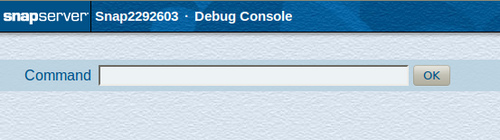 CMDline des Overland-Servers
 -
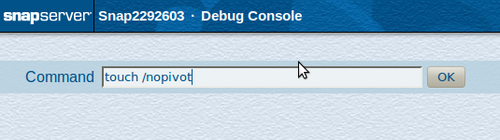 Datei erstellen


Um einen Overland Server resetten zu können muss eine Datei Namens 'nopivot' in der Root-Ebene erstellt werden. Diese Datei wird beim nächsten Neustart erkannt und es ist anschließend möglich das Guardian.OS Image neu zu laden. Der Overland Thomas-Krenn Server wird dabei komplett resettet.
Nach dem Neustart
Nachdem Sie den Overland-Server neu gestartet haben, erhalten Sie folgende Bildschirmausgabe.
-
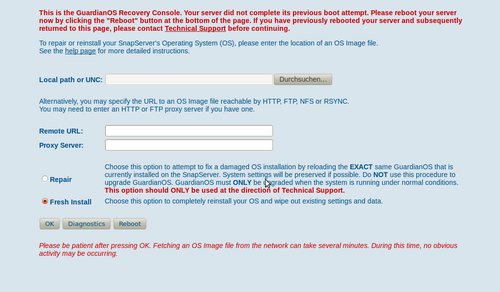 Neue Installation
 -
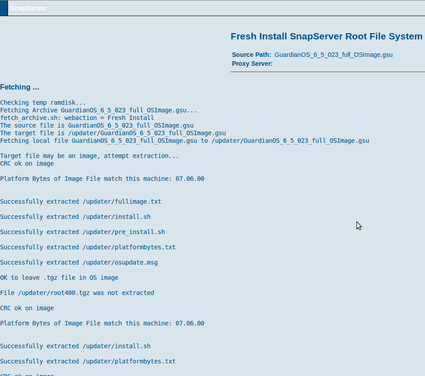 Screen bei dem Installieren


Nachdem Sie das Guardian.OS Image ausgewählt haben, können Sie einen "fresh install" durchführen. Nachdem Sie dieses ausgeführt haben wird das Image einige Minuten geladen(Image-Größe ca. 140MB). Des weiteren sehen Sie die Installationsinformationen.
Installationsinformationen
Continuing Fresh Install
Source Path:	GuardianOS_6_5_023_full_OSImage.gsu
Proxy Server:
Installing ...

Using IMAGE target file '/updater/GuardianOS_6_5_023_full_OSImage.gsu' and install script './fullinstall.sh'
-rw-r--r-- 1 0 0 137700715 Oct 12 12:04 GuardianOS_6_5_023_full_OSImage.gsu
./install_tools/
./install_tools/dd
./install_tools/tpaImport.sh
./install_tools/grub/
./install_tools/grub/grub
./install_tools/grub/stage1
./install_tools/grub/stage2
./install_tools/installroot.sh
./install_tools/upgraderoot.sh
./install_tools/fstab
./install_tools/mdadm
./install_tools/mkdir
./install_tools/mknod
./install_tools/touch
./install_tools/partdev.sh
./install_tools/install_tools_common.sh
./install_tools/flashupdate.sh
./install_tools/checkver
./install_tools/Humboldt-partition.sh
./install_tools/pickhintdevice
./install_tools/manufacture.sh
./install_tools/pickhintraid
./install_tools/partitionize.sh
./install_tools/mkswap
./install_tools/sfdiskmap
./install_tools/sfdisk
./install_tools/sfdiskvalidate
./install_tools/fullupgrade.sh
./install_tools/mkfs.xfs
./install_tools/mkboot.sh
./install_tools/fullinstall.sh
./install_tools/post_upgrade.sh
./install_tools/sfdiskhint
CRC ok on image

Platform Bytes of Image File match this machine: 07.06.00


Warning: Piped process returned -1

Successfully extracted *.tgz to pipe

UTILDIR=/updater/install_tools
TOOLDIR=/mnt/pivot/bin
MDUTIL=/bin/mdadm
Starting ./fullinstall.sh
Executing ./fullinstall.sh ../GuardianOS_6_5_023_full_OSImage.gsu
Archiving FLAPI DB file
root installation script
mknod /dev/md0 b 9 0
mknod /dev/md100root b 9 100
mknod /dev/md101swap b 9 101
attempting to stop raids (if present)
/bin/mdadm --stop /dev/md100root
mdadm: stopped /dev/md100root
/bin/mdadm --stop /dev/md101swap
mdadm: stopped /dev/md101swap
- Clean Head Drives -
Cleared sda
Cleared sdb
Re-read /dev/sda partition
Re-read /dev/sdb partition
- Partition Head Drives -
Warning: extended partition does not start at a cylinder boundary.
DOS and Linux will interpret the contents differently.

Disk /dev/sda: 60801 cylinders, 255 heads, 63 sectors/track
Old situation:
Units = cylinders of 8225280 bytes, blocks of 1024 bytes, counting from 0

   Device Boot Start     End   #cyls    #blocks   Id  System
/dev/sda1   *      0+     32-     33-    262144   83  Linux
/dev/sda2         32+    554-    523-   4194304   83  Linux
/dev/sda3        554+  60801-  60247- 483929112    5  Extended
/dev/sda4       1599+  60801-  59203- 475540480   83  Linux
/dev/sda5        555+   1599-   1045-   8387584   83  Linux
New situation:
Units = sectors of 512 bytes, counting from 0

   Device Boot    Start       End   #sectors  Id  System
/dev/sda1   *      2048    526335     524288  83  Linux
/dev/sda2        526336   8914943    8388608  83  Linux
/dev/sda3       8914944 976773167  967858224   5  Extended
/dev/sda4      25692160 976773119  951080960  83  Linux
/dev/sda5       8916992  25692159   16775168  83  Linux
Successfully wrote the new partition table

Re-reading the partition table ...
Warning: extended partition does not start at a cylinder boundary.
DOS and Linux will interpret the contents differently.

Disk /dev/sdb: 60801 cylinders, 255 heads, 63 sectors/track
Old situation:
Units = cylinders of 8225280 bytes, blocks of 1024 bytes, counting from 0

   Device Boot Start     End   #cyls    #blocks   Id  System
/dev/sdb1   *      0+     32-     33-    262144   83  Linux
/dev/sdb2         32+    554-    523-   4194304   83  Linux
/dev/sdb3        554+  60801-  60247- 483929112    5  Extended
/dev/sdb4       1599+  60801-  59203- 475540480   83  Linux
/dev/sdb5        555+   1599-   1045-   8387584   83  Linux
New situation:
Units = sectors of 512 bytes, counting from 0

   Device Boot    Start       End   #sectors  Id  System
/dev/sdb1   *      2048    526335     524288  83  Linux
/dev/sdb2        526336   8914943    8388608  83  Linux
/dev/sdb3       8914944 976773167  967858224   5  Extended
/dev/sdb4      25692160 976773119  951080960  83  Linux
/dev/sdb5       8916992  25692159   16775168  83  Linux
Successfully wrote the new partition table

Re-reading the partition table ...

Partitioned /dev/sda

Partitioned /dev/sdb
Re-read /dev/sda partitions
Re-read /dev/sdb partitions
FS added to /dev/sdb1
FS added to /dev/sda1
Deleting superblock on /dev/sda4
Deleting superblock on /dev/sdb4


********* Discovering Expansion Units *********

/bin/mdadm --create --force -R -l 1 -c 32 -e 0 -n 2 /dev/md100root /dev/sda2  missing
mdadm: /dev/sda2 appears to be part of a raid array:
    level=raid1 devices=2 ctime=Tue Oct 11 14:04:18 2011
mdadm: array /dev/md100root started.
md100 created
/bin/mdadm --create --force -R -l 1 -c 32 -e 0 -n 2 /dev/md101swap /dev/sda5  missing
mdadm: /dev/sda5 appears to be part of a raid array:
    level=raid1 devices=2 ctime=Tue Oct 11 14:04:18 2011
mdadm: array /dev/md101swap started.
md101 created
DRVMAP='33'

--->hotadding /dev/sdb...
using /dev/sdb2 and /dev/sdb5
/bin/mdadm -a  /dev/md100root /dev/sdb2
mdadm: added /dev/sdb2
/bin/mdadm -a /dev/md101swap /dev/sdb5
mdadm: added /dev/sdb5
/updater/install_tools/mkswap /dev/md101swap
Setting up swapspace version 1, size = 8588816 kB
/updater/install_tools/mkfs.xfs -f /dev/md100root
meta-data=/dev/md100root         isize=256    agcount=4, agsize=262140 blks
         =                       sectsz=512   attr=2
data     =                       bsize=4096   blocks=1048560, imaxpct=25
         =                       sunit=0      swidth=0 blks
naming   =version 2              bsize=4096   ascii-ci=0
log      =internal log           bsize=4096   blocks=2560, version=2
         =                       sectsz=512   sunit=0 blks, lazy-count=1
realtime =none                   extsz=4096   blocks=0, rtextents=0
Mounting new root to /mnt/pivot
-rw-r--r-- 1 0 0 137700715 Oct 12 12:04 /updater/install_tools/../GuardianOS_6_5_023_full_OSImage.gsu
Removing any previous root FS just in case
Extracting root file system
CRC ok on image

Platform Bytes of Image File match this machine: 07.06.00


Warning: Piped process returned -1

Successfully extracted *.tgz to pipe

Creating .bash_history file with mode 664
Install root FS done
Successfully loaded root filesystem.
/mnt/pivot/firmware/WAV40602.def
Setting BIOS defaults using WAV40602.def
Removing BMC, BIOS, and BIOS defaults files
ls: /mnt/pivot/boot/*.hex: No such file or directory
Removing /mnt/pivot/boot/Guardian-initrd.smp
Removing /mnt/pivot/boot/System.map-gos-smp
Removing /mnt/pivot/boot/checksum.smp
Removing /mnt/pivot/boot/config-gos-smp
Removing /mnt/pivot/boot/vmlinuz-gos-smp
=== upgrade boot partition ===
Using grub from /mnt/pivot/install_tools
grub (GNU GRUB 0.97)
updating boot partition: /dev/sda1 for DRIVE 0
SOURCE_DIR is /mnt/pivot/boot and SOURCE_DEV=
found valid /updater/fullimage.txt file
/dev/sda1 OK
updating boot partition: /dev/sdb1 for DRIVE 1
SOURCE_DIR is /mnt/pivot/boot and SOURCE_DEV=
found valid /updater/fullimage.txt file
/dev/sdb1 OK
mkboot exiting - retcode = 0
Removing /mnt/pivot/boot
Restoring Archived FLAPI DB
Removing legacy SnapExtensions from FLAPI DB
Removing /mnt/pivot/install_tools/Humboldt-partition.sh
Removing /mnt/pivot/install_tools/checkver
Removing /mnt/pivot/install_tools/dd
Removing /mnt/pivot/install_tools/flashupdate.sh
Removing /mnt/pivot/install_tools/fstab
Removing /mnt/pivot/install_tools/fullinstall.sh
Removing /mnt/pivot/install_tools/fullupgrade.sh
Removing /mnt/pivot/install_tools/install_tools_common.sh
Removing /mnt/pivot/install_tools/installroot.sh
Removing /mnt/pivot/install_tools/manufacture.sh
Removing /mnt/pivot/install_tools/mdadm
Removing /mnt/pivot/install_tools/mkdir
Removing /mnt/pivot/install_tools/mkfs.xfs
Removing /mnt/pivot/install_tools/mknod
Removing /mnt/pivot/install_tools/mkswap
Removing /mnt/pivot/install_tools/pickhintraid
Installing rc.postUpgrade
Removing /mnt/pivot/install_tools/post_upgrade.sh
Removing /mnt/pivot/install_tools/touch
Installing tpaImport.sh
Removing /mnt/pivot/install_tools/upgraderoot.sh
./fullinstall.sh completed successfully
PATH=/usr/local/bin:/bin:/usr/bin:/usr/X11R6/bin:.:/sbin:/usr/bin

Fresh Install Completed Successfully
Reboot will take about 2 minutes
Snap Ausgabe nach der Installation
Fresh Install SnapServer Root File System
Source Path:	GuardianOS_6_5_023_full_OSImage.gsu
Proxy Server:
Fetching ...

Checking temp ramdisk...
Fetching Archive GuardianOS_6_5_023_full_OSImage.gsu...
fetch_archive.sh: webaction = Fresh Install
The source file is GuardianOS_6_5_023_full_OSImage.gsu
The target file is /updater/GuardianOS_6_5_023_full_OSImage.gsu
Fetching local file GuardianOS_6_5_023_full_OSImage.gsu to /updater/GuardianOS_6_5_023_full_OSImage.gsu

Target file may be an image, attempt extraction...
CRC ok on image

Platform Bytes of Image File match this machine: 07.06.00


Successfully extracted /updater/fullimage.txt

Successfully extracted /updater/install.sh

Successfully extracted /updater/pre_install.sh

Successfully extracted /updater/platformbytes.txt

Successfully extracted /updater/osupdate.msg

OK to leave .tgz file in OS image

File /updater/root400.tgz was not extracted

CRC ok on image

Platform Bytes of Image File match this machine: 07.06.00


Successfully extracted /updater/install.sh

Successfully extracted /updater/platformbytes.txt

CRC ok on image

Platform Bytes of Image File match this machine: 07.06.00


Warning: Piped process returned -1

Successfully extracted *.tgz to pipe

.......................
Current Kernel Version:
6.5.023
201103181110
New Root FS Version:
6.5.023
201103181110
.......................

WARNING: Fresh Install will destroy your server's settings and data!
Weiterführende Links
http://www.overlandstorage.com/products/network-attached-storage/snapserver-n2000.aspx